
Wednesday, June 30, 2010


Tuesday, April 27, 2010
What About If My Company's Computer Won't Allow Me to Set Up Homepage in Browser?
In case you could not set up your homepage for your browser, you can make an alternative homepage. Do following steps:
Step 1
Open a new Notepad file. Copy following code into that file, than save it as "baseOF me.html" onto your desktop.
Step 2
After Step 1, you will see an icon "baseOF.me" in your desktop. Drag and drop this icon to your Quick Launch bar. You will see a new icon in Quick Launch bar.
 You have done it. Each time you click this new icon in Quick Launch, your baseOF.me will be shown.
If you do not have Quick Launch bar, move your mouse to Task Bar which is located at bottom of your desktop, right click it, click Toolbars at very top, you will see Quick Launch. Click it. Done.

Step 1
Open a new Notepad file. Copy following code into that file, than save it as "baseOF me.html" onto your desktop.
<html><head><script language='Javascript'>window.onload=function(){var w=window.open('http://baseof.me','','copyhistory=yes,directories=yes,location=yes,menubar=yes,modal=no,resizable=yes,scrollbars=yes,status=yes,toolbar=yes,width='+screen.availWidth+',height='+screen.availHeight+',left=0,top=0');self.blur();w.focus()}</script></head></body></html>
Step 2
After Step 1, you will see an icon "baseOF.me" in your desktop. Drag and drop this icon to your Quick Launch bar. You will see a new icon in Quick Launch bar.
You have done it. Each time you click this new icon in Quick Launch, your baseOF.me will be shown.If you do not have Quick Launch bar, move your mouse to Task Bar which is located at bottom of your desktop, right click it, click Toolbars at very top, you will see Quick Launch. Click it. Done.
Friday, April 23, 2010
Is baseOF.me Safe If You Are Using Public Computer?
Enabling use public computer to access baseOF.me indeed is major reason why you should use baseOF.me. Service at baseOF.me becomes particular useful and important when people travelling away from their own computer. That is what the online personal portal used for.
What user should bear in the mind is, it is ESSENTIAL to log out after use. And please remember to log out by click button "Not My Own Computer. Log Out". In this case, simply close your browser is NOT good enough. If you forget doing this, it is better to log in again and then properly log out.
What about if you forget properly logging out at a public computer such as Internet Cafe? You should still not worry about it. baseOF.me uses sophisticated technologies to determine if the server should send you the private information. These technologies include session control, cookies as well as IP address analysis. It is unlikely someone else will be able to access your information even when you forget to log out.
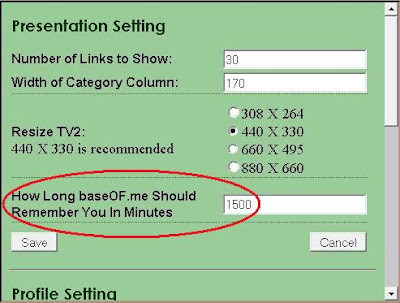
 To further secure your privacy, you need to remember two things. First, NEVER EVER story your passwords with baseOF.me. Second, before your travel, set your "How Long baseOF.me Should Remember You In Minutes" to 0 minute. Zero minute means if you close your browser, you will need to log in again even your reopen your browser immediately. Where you can find it? Click Link "Setting" located at top middle of your screen, then you will see it.
What user should bear in the mind is, it is ESSENTIAL to log out after use. And please remember to log out by click button "Not My Own Computer. Log Out". In this case, simply close your browser is NOT good enough. If you forget doing this, it is better to log in again and then properly log out.
What about if you forget properly logging out at a public computer such as Internet Cafe? You should still not worry about it. baseOF.me uses sophisticated technologies to determine if the server should send you the private information. These technologies include session control, cookies as well as IP address analysis. It is unlikely someone else will be able to access your information even when you forget to log out.
To further secure your privacy, you need to remember two things. First, NEVER EVER story your passwords with baseOF.me. Second, before your travel, set your "How Long baseOF.me Should Remember You In Minutes" to 0 minute. Zero minute means if you close your browser, you will need to log in again even your reopen your browser immediately. Where you can find it? Click Link "Setting" located at top middle of your screen, then you will see it.
Is baseOF.me Safe to Use?
First of all, users are not allowed to store the passwords with baseOF.me. The users are only allowed to save Password Hints in baseOF.me. It is user's responsible to make sure these password hints can only be meaningful and understandable for him/her. No one else.
Second, users access their accounts in other websites through their own browser and not through baseOF.me. baseOF.me does only help you to remember your User Account Name and Password Hint, and does not manage your access to any website.
Third, all sensitive data can only be accessed after logged in. In other words, they are protected by password. What are sensitive data? Apart from accounts information, all User Accounts Names and Password Hints are sensitive data. If you are not logged in, these sensitive data will be sit in the server and never be transferred to user's computer over the Internet.
Fourth, your password is encrypted and checked at server side each time when you logged in.
So, the answer to your question is, it is safe to use baseOF.me.
Second, users access their accounts in other websites through their own browser and not through baseOF.me. baseOF.me does only help you to remember your User Account Name and Password Hint, and does not manage your access to any website.
Third, all sensitive data can only be accessed after logged in. In other words, they are protected by password. What are sensitive data? Apart from accounts information, all User Accounts Names and Password Hints are sensitive data. If you are not logged in, these sensitive data will be sit in the server and never be transferred to user's computer over the Internet.
Fourth, your password is encrypted and checked at server side each time when you logged in.
So, the answer to your question is, it is safe to use baseOF.me.
Thursday, April 22, 2010
Deal with Website It Automatically Becomes Full Screen
Some websites do not allow their pages stay in the frame, ie TV1 and TV2 in baseOF.me. If you add a website of this kind, when you click it, it becomes full screen.
To cope with it, simply remove it from your TV Channels.
To cope with it, simply remove it from your TV Channels.
Wednesday, April 21, 2010
Set IE Automatically Reload Pages
Sometime Internet Explorer does not automatically reload or refresh pages. To set it correctly, you need to go:
'Tools' → 'Internet Options' → 'General' → 'Browsing history' → untick 'Delete browsing history on exit' → click 'Settings'
In new window:
'Temporary Internet Files' → Click 'Automatically'
Click 'Ok' → 'Apply'.
Done.
'Tools' → 'Internet Options' → 'General' → 'Browsing history' → untick 'Delete browsing history on exit' → click 'Settings'
In new window:
'Temporary Internet Files' → Click 'Automatically'
Click 'Ok' → 'Apply'.
Done.
Allow Access Clipboard in Firefox
Enable Firefox to Allow Direct Copy
baseOF.me allow you to retain User Account Name and Passport Hint in any Link Item. When you click the Link Item, a Prescreen will open in TV1. You then can click Go There to where you want.
In Internet Explorer, after click button Go There, you can press Ctrl V to paste your User Account Number to sign-in field in your destination website. However, by default, it is not allowed in Firefox. However, you can enable your Firefox. There are several steps:
Step 1:
Open a new Firefox window.
Step 2:
Type "about:config" in address bar of Firefox, then press Enter key in your keyboard.
Step 3:
In Filter box, type "signed.applets.codebase_principal_support". Press Enter.
Step 4:
You will see item 'signed.applets.codebase_principal_support' appears. Double click it, you will see the value changed to 'true'. Close the Firefox window.
Step 5:
You have actually done it. When you first time to click Link Item, an Internet Security window will open. Click checkbox 'Remember this decision', then click button 'Allow'. Everything is set now.
baseOF.me allow you to retain User Account Name and Passport Hint in any Link Item. When you click the Link Item, a Prescreen will open in TV1. You then can click Go There to where you want.
In Internet Explorer, after click button Go There, you can press Ctrl V to paste your User Account Number to sign-in field in your destination website. However, by default, it is not allowed in Firefox. However, you can enable your Firefox. There are several steps:
Step 1:
Open a new Firefox window.
Step 2:
Type "about:config" in address bar of Firefox, then press Enter key in your keyboard.
Step 3:
In Filter box, type "signed.applets.codebase_principal_support". Press Enter.
Step 4:
You will see item 'signed.applets.codebase_principal_support' appears. Double click it, you will see the value changed to 'true'. Close the Firefox window.
Step 5:
You have actually done it. When you first time to click Link Item, an Internet Security window will open. Click checkbox 'Remember this decision', then click button 'Allow'. Everything is set now.
Subscribe to:
Posts (Atom)
Subscribe To


 Posts
All Comments
Posts
All Comments